[DEVELOP]
- [DEVELOP] DDD, TDD, BDD
- [DEVELOP] 개인정보 보호 웹사이트 구축을 위한
- [DEVELOP] 예제로 이해하는 웹 접근성 (accessibility)
- [DEVELOP] 예제로 보는 이미지 사용법 (Images)
- [DEVELOP] 예제로 보는 반응형 디자인 사용법 (Responsive Design)
- [DEVELOP] PWA 이해하기 (Progressive Web App)
- [DEVELOP] 개발 프로세스 Agile / Waterfall 이란?
- [DEVELOP] 주니어 개발자의 역습
- [DEVELOP] MCP(Model Context Protocol)
- [DEVELOP] MCP claude 적용하고 사용해보기
- [DEVELOP] 실시간 통신 방식 비교 (HTTP, SSE, WebSocket, stdio)
- [DEVELOP] 클로드 코드 50만 줄 소스코드 유출 사건 분석
- [DEVELOP] Claude Code ‘컨텍스트 로트’ 현상과 비용 80% 절감법
- [DEVELOP] 에이전트 하네스 엔지니어링이란? — AI 에이전트를 제대로 다루는 기술
- [DEVELOP] Turborepo 캐시로 CI/CD 빌드 시간을 90% 줄이는 법
- [DEVELOP] 모노레포 빌드 10분 → 2분, Turborepo 캐시와 CI/CD 최적화 실전기
- [DEVELOP] Cursor Agent로 PR 자동 리뷰 시스템 만들기 — Skill 기반 워크플로우 설계
- [DEVELOP] Claude Fable 5·Mythos 5 전면 중단 — 출시 3일 만에 꺼진 AI
- [DEVELOP] 실무 모노레포에 에이전트 하네스를 깔고 운영해본 기록
- [DEVELOP] Chrome DevTools에 생긴 WebMCP — 웹사이트가 에이전트에게 도구를 넘기는 법
- [DEVELOP] Cursor Plugin — .cursor를 패키지로 배포하는 공식 방법
플랫폼에 1:1 실시간 채팅을 넣으려고 합니다. “유저끼리 직접 소켓 연결하는 거 아닌가?”부터 시작해서, 메시지 저장은 누가 하는지, 10만 DAU면 서버가 버티는지, 알림은 어떻게 분기하는지까지 — 채팅 시스템 전체 아키텍처를 정리합니다.
1. 통신 방식 선택
| 방식 |
특징 |
적합한 경우 |
| WebSocket |
양방향, 지속 연결, 저지연 |
채팅, 실시간 알림 (가장 추천) |
| SSE (Server-Sent Events) |
단방향 (서버→클라이언트), HTTP 기반 |
알림만 필요할 때 |
| Long Polling |
HTTP 요청 반복, 호환성 좋음 |
레거시 환경 |
| WebTransport |
HTTP/3 기반, UDP 위 양방향 |
초저지연 게임, 미디어 (아직 실험적) |
중고거래 1:1 채팅이면 WebSocket이 정답이다. Socket.IO를 쓰면 재연결, 방(Room) 관리, 폴백(Long Polling) 처리까지 한번에 해결된다.
2. 핵심 개념: 유저↔유저가 아니라 유저↔서버↔유저
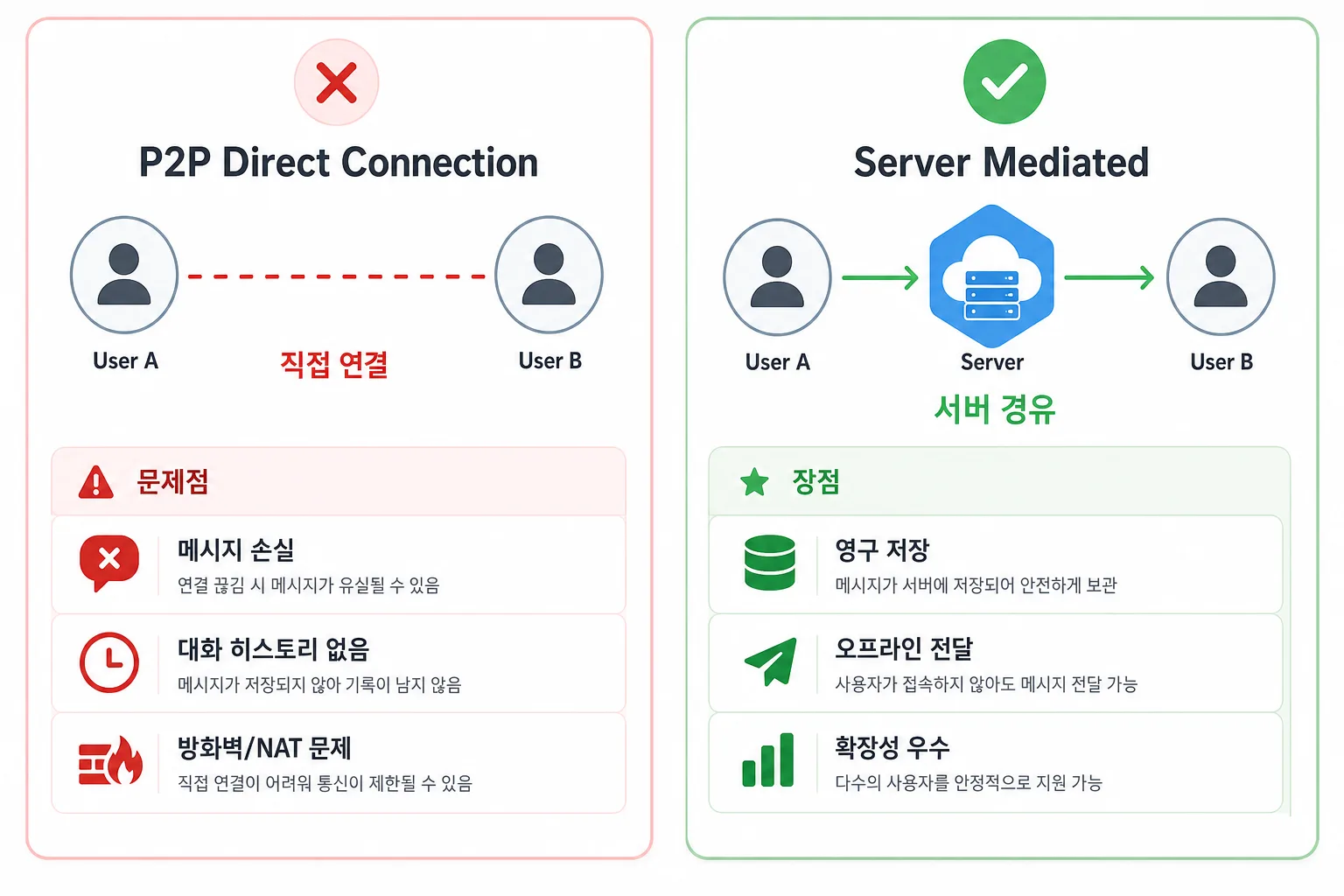
처음에 “유저끼리 직접 소켓을 열어서 통신하는 거 아닌가?” 라고 생각할 수 있다. 하지만 실제 채팅 시스템은 항상 중앙 서버를 경유한다.
1
2
3
4
5
6
| ❌ P2P (잘못된 이해)
유저A ←────────────→ 유저B
직접 소켓 연결
✅ 실제 구조 (중앙 서버 경유)
유저A ←→ [Socket 서버] ←→ 유저B
|
왜 직접 연결하지 않는가?
| 문제 |
P2P |
서버 경유 |
| 상대가 오프라인이면? |
메시지 유실 |
서버가 DB에 저장 후 나중에 전달 |
| 3명 이상 그룹챗? |
N:N 연결 복잡 |
Room에 추가하면 끝 |
| 채팅 내역 보관? |
앱 삭제하면 소실 |
서버 DB에 영구 보관 |
| NAT/방화벽? |
연결 자체가 어려움 |
서버 하나만 열면 됨 |
| 악성 메시지 필터링? |
불가 |
서버에서 검증 가능 |
카카오톡도 동일한 구조다: 나 → 카카오 서버 → 친구
3. 전체 시스템 아키텍처
1
2
3
4
5
6
7
8
9
10
11
12
13
14
15
16
17
18
19
20
21
22
23
24
25
26
| ┌─────────────────────────────────────────────────────────────┐
│ 클라이언트 (React) │
│ ┌──────────┐ ┌──────────────┐ ┌───────────────────┐ │
│ │ 채팅 UI │ → │ Socket Hook │ → │ WebSocket Client │ │
│ └──────────┘ └──────────────┘ └─────────┬─────────┘ │
└───────────────────────────────────────────────┼─────────────┘
│ ws://
┌───────────────────────────────────────────────┼─────────────┐
│ 백엔드 서버 │ │
│ ┌────────────────┐ ┌───────────────────────▼──────────┐ │
│ │ REST API │ │ WebSocket Server (Socket.IO) │ │
│ │ (채팅방 CRUD) │ │ - 연결 관리 │ │
│ │ (메시지 조회) │ │ - 메시지 브로드캐스트 │ │
│ └───────┬────────┘ │ - Room 관리 │ │
│ │ └───────────────────────┬──────────┘ │
│ │ │ │
│ ┌───────▼────────────────────────────────────▼──────────┐ │
│ │ Message Broker (Redis Pub/Sub) │ │
│ └───────────────────────┬───────────────────────────────┘ │
│ │ │
│ ┌───────────────────────▼───────────────────────────────┐ │
│ │ Database │ │
│ │ - MongoDB (메시지 저장) or PostgreSQL │ │
│ │ - Redis (온라인 상태, 읽음 처리, 캐싱) │ │
│ └───────────────────────────────────────────────────────┘ │
└─────────────────────────────────────────────────────────────┘
|
데이터 흐름 요약:
| 채널 |
역할 |
예시 |
| REST API |
과거 데이터 조회 |
채팅방 목록, 메시지 히스토리, 유저 프로필 |
| WebSocket |
실시간 이벤트 전달 |
새 메시지, 타이핑 중, 읽음 표시, 온라인 상태 |
4. Room 개념 — 포트 여러 개가 아니다
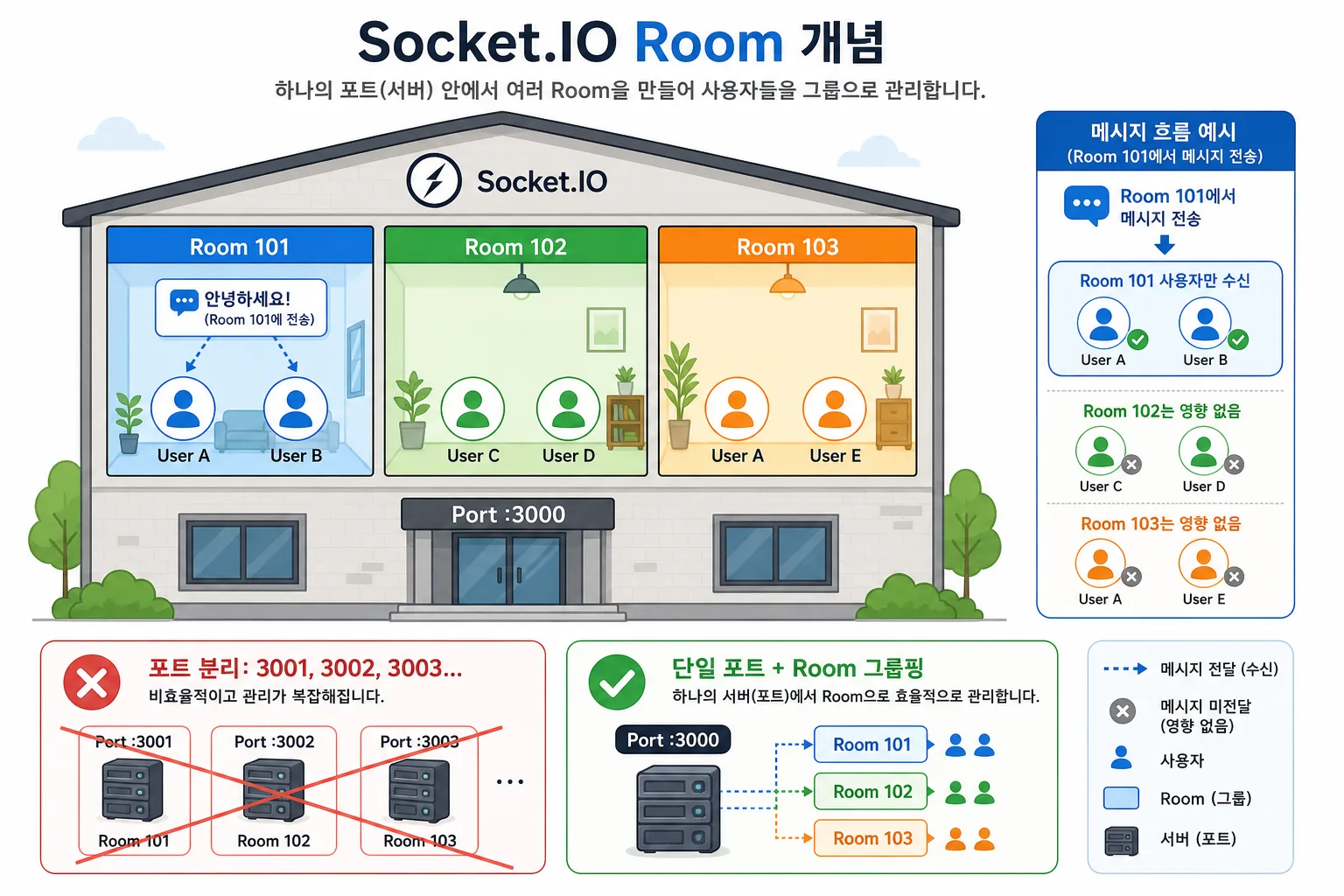
“채팅방마다 포트를 하나씩 여는 건가?” → 아니다. 포트는 하나, 서버 내부에서 Room이라는 논리적 그룹으로 나눈다.
1
2
3
4
5
6
7
8
| ❌ 포트로 분리
채팅방1 → :3001
채팅방2 → :3002
→ 방 10만개면 포트 10만개? 불가능
✅ 실제: 포트 1개, 내부에서 Room으로 분류
모든 유저 → :3000 (단일 포트)
서버 내부에서 "이 유저는 room-A, 저 유저는 room-B" 태깅
|
Room은 서버 메모리에 있는 Set(집합)일 뿐이다:
1
2
3
4
5
6
| // Socket.IO 내부 구조 (개념적)
const rooms = {
"room-1": Set(["socketId-유저A", "socketId-유저B"]),
"room-2": Set(["socketId-유저C", "socketId-유저D"]),
"room-3": Set(["socketId-유저A", "socketId-유저E"]),
};
|
하나의 유저가 여러 Room에 동시에 속할 수 있다 (여러 채팅방 참여).
1
2
3
4
5
6
7
8
9
10
11
12
13
14
15
16
| const io = new Server(3000);
io.on("connection", (socket) => {
socket.on("join_room", (roomId: string) => {
socket.join(roomId);
});
socket.on("leave_room", (roomId: string) => {
socket.leave(roomId);
});
socket.on("send_message", (data) => {
io.to(data.roomId).emit("new_message", data);
// io.to()는 해당 Room에 join한 소켓들에게만 전달
});
});
|
비유하면 건물 하나(포트)에 방이 여러 개 있는 것이다. 101호에서 말하면 101호 사람만 들린다.
5. 메시지 저장 — Socket.IO는 저장 안 한다
Socket.IO는 전달만 하는 파이프다. 저장은 직접 해야 한다.
1
2
3
4
5
6
7
8
9
10
11
12
13
| 유저A가 메시지 전송
│
▼
┌─────────────────────────────────┐
│ Socket.IO 서버 (메시지 수신) │
│ │
│ 1. DB에 메시지 저장 ← ★ │
│ 2. 상대방에게 실시간 전달 │
│ 3. 읽음 상태 업데이트 │
└─────────────────────────────────┘
│
▼
유저B가 실시간으로 메시지 수신
|
저장소 역할 분담
| 저장소 |
역할 |
이유 |
| MongoDB |
메시지 영구 저장 |
Document 구조가 채팅에 적합 (시간순 정렬, 방별 조회) |
| PostgreSQL |
메시지 영구 저장 (대안) |
이미 RDB 쓰고 있으면 이걸로도 충분 |
| Redis |
최근 메시지 캐싱 + 온라인 상태 + 읽음 처리 |
초고속, 휘발성 데이터에 적합 |
| S3/CDN |
이미지/파일 저장 |
채팅에서 사진 보낼 때 |
서버 측 저장 패턴
1
2
3
4
5
6
7
8
9
10
11
12
13
14
15
16
17
| socket.on("send_message", async (data) => {
// 1) DB에 영구 저장
const saved = await db.collection("messages").insertOne({
roomId: data.roomId,
senderId: socket.userId,
content: data.content,
type: "text",
isRead: false,
createdAt: new Date(),
});
// 2) Redis에 최근 메시지 캐싱 (채팅방 목록 미리보기용)
await redis.set(`room:${data.roomId}:lastMessage`, data.content);
// 3) 상대방에게 실시간 전달
io.to(data.roomId).emit("new_message", saved);
});
|
과거 메시지 조회 = REST API
채팅방 첫 입장 시, 소켓이 아닌 REST API로 DB에서 가져온다:
1
2
3
4
5
6
7
8
9
10
11
| 유저가 채팅방 입장
│
├─── ① REST API 호출 (과거 메시지 로드)
│ GET /api/chat/rooms/room-123/messages?limit=30
│ → DB에서 최근 30건 가져옴 → 화면 렌더링
│
├─── ② 소켓 연결 + 방 입장
│ socket.emit('join_room', 'room-123')
│ → 이 시점부터 새 메시지 실시간 수신
│
└─── 위로 스크롤 → REST API로 이전 메시지 추가 로드 (무한스크롤)
|
6. 프론트엔드 구현 패턴 (React + TanStack Query)
1
2
3
4
5
6
7
8
9
10
11
12
13
14
15
16
17
18
19
20
21
22
23
24
25
26
27
28
29
30
31
32
33
34
35
36
37
38
39
40
41
42
43
44
45
46
47
48
49
50
51
52
53
54
55
56
57
| // hooks/useChat.ts
import { useEffect, useRef, useCallback, useState } from "react";
import { io, Socket } from "socket.io-client";
import { useQuery } from "@tanstack/react-query";
interface Message {
id: string;
roomId: string;
senderId: string;
content: string;
type: "text" | "image" | "system";
isRead: boolean;
createdAt: string;
}
export const useChat = (roomId: string) => {
const socketRef = useRef<Socket | null>(null);
const [realtimeMessages, setRealtimeMessages] = useState<Message[]>([]);
const [isConnected, setIsConnected] = useState(false);
// 과거 메시지: TanStack Query로 캐싱 + 무한스크롤
const { data: history } = useQuery({
queryKey: ["chat", roomId, "messages"],
queryFn: () => fetchMessages(roomId, { limit: 30 }),
});
useEffect(() => {
socketRef.current = io(CHAT_SERVER_URL, {
auth: { token: getAccessToken() },
transports: ["websocket"],
});
socketRef.current.on("connect", () => setIsConnected(true));
socketRef.current.on("disconnect", () => setIsConnected(false));
socketRef.current.emit("join_room", roomId);
socketRef.current.on("new_message", (message: Message) => {
setRealtimeMessages((prev) => [...prev, message]);
});
return () => {
socketRef.current?.disconnect();
};
}, [roomId]);
const sendMessage = useCallback(
(content: string) => {
socketRef.current?.emit("send_message", { roomId, content });
},
[roomId],
);
const messages = [...(history ?? []), ...realtimeMessages];
return { messages, sendMessage, isConnected };
};
|
설계 포인트: 과거 메시지는 TanStack Query로 캐싱하고, 실시간 메시지는 로컬 state로 관리한다. 두 영역을 분리하면 새로고침/뒤로가기 시 캐시 히트가 되면서 UX가 좋아진다.
7. 알림 분기 처리 — 앱 상태에 따라 다르게
카카오톡처럼 “채팅방 열고 있으면 푸시 안 오고, 앱 끄면 푸시 오고” 하는 건 서버가 유저 상태를 추적하기 때문이다.
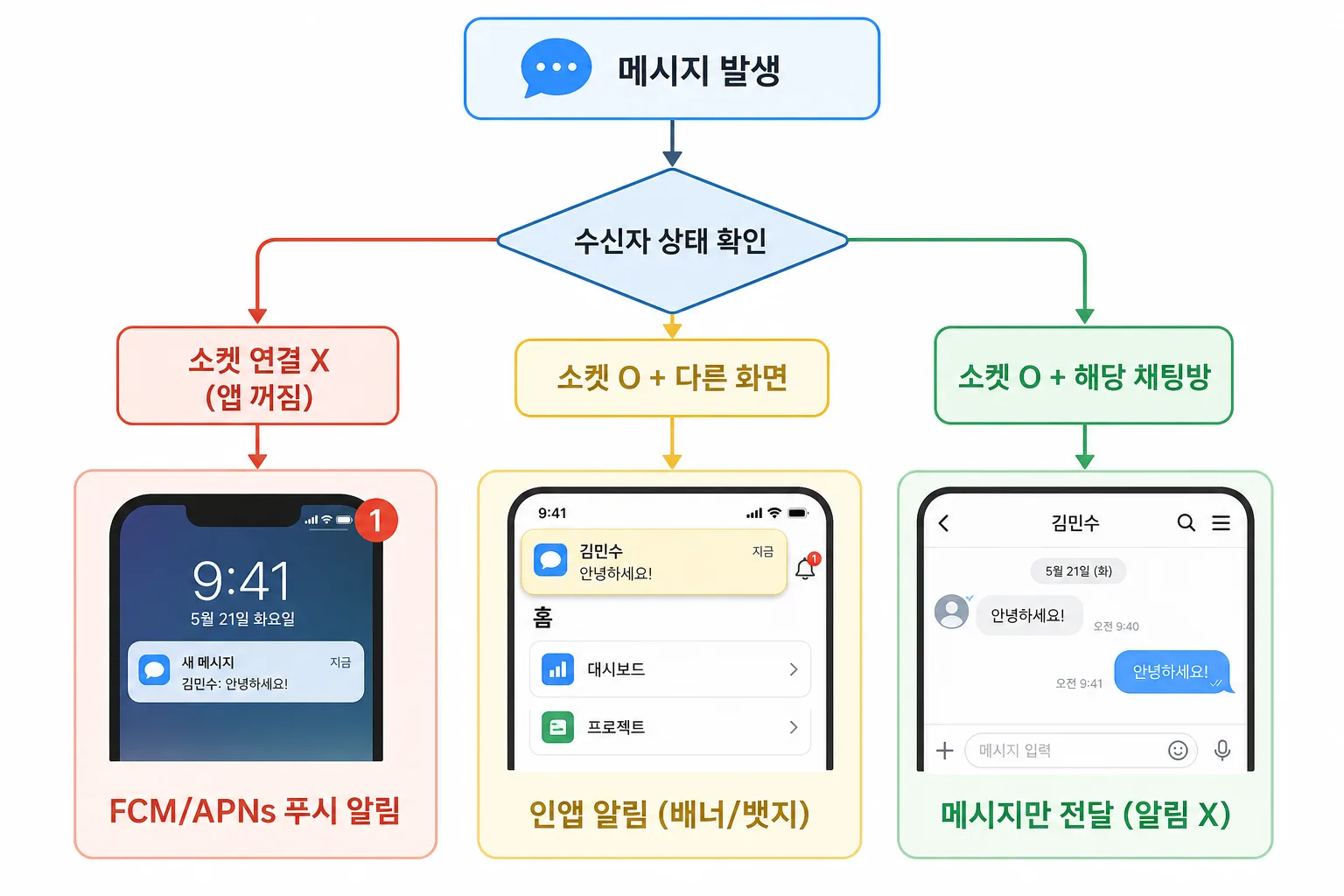
유저 상태 3가지
1
2
3
4
5
6
7
8
9
10
| ┌─────────────────────────────────────────────────────┐
│ 상태 1: 해당 채팅방 안에 있음 (포그라운드 + 해당 방) │
│ → 아무것도 안 함 (이미 실시간으로 보고 있으니까) │
│ │
│ 상태 2: 앱은 열려있지만 다른 화면 (포그라운드) │
│ → 앱 내 알림 (인앱 배너, 뱃지 숫자 +1) │
│ │
│ 상태 3: 앱 꺼져있음 (백그라운드 / 종료) │
│ → 푸시 알림 (FCM / APNs) │
└─────────────────────────────────────────────────────┘
|
서버 측 분기 로직
1
2
3
4
5
6
7
8
9
10
11
12
13
14
15
16
17
18
19
20
21
22
23
24
25
26
27
28
29
30
31
32
33
34
35
36
37
38
39
40
41
42
43
44
45
46
47
48
49
50
51
| // 온라인 상태 관리
const onlineUsers = new Map<string, string>(); // userId → socketId
const userFocusRoom = new Map<string, string>(); // userId → 현재 보고 있는 roomId
io.on("connection", (socket) => {
onlineUsers.set(socket.userId, socket.id);
socket.on("focus_room", (roomId: string) => {
userFocusRoom.set(socket.userId, roomId);
});
socket.on("unfocus_room", () => {
userFocusRoom.delete(socket.userId);
});
socket.on("disconnect", () => {
onlineUsers.delete(socket.userId);
userFocusRoom.delete(socket.userId);
});
});
// 메시지 발송 시 분기
socket.on("send_message", async (data) => {
const message = await saveMessage(data);
for (const userId of room.participants) {
if (userId === data.senderId) continue;
const isOnline = onlineUsers.has(userId);
const focusedRoom = userFocusRoom.get(userId);
if (!isOnline) {
// 앱 꺼져있음 → OS 푸시
await sendPushNotification(userId, {
title: senderName,
body: data.content,
data: { roomId: data.roomId },
});
} else if (focusedRoom !== data.roomId) {
// 앱 열려있지만 다른 화면 → 인앱 알림
io.to(onlineUsers.get(userId)!).emit("notification", {
type: "new_message",
roomId: data.roomId,
preview: data.content,
});
} else {
// 해당 채팅방에 있음 → 메시지만 전달, 알림 없음, 즉시 읽음 처리
io.to(onlineUsers.get(userId)!).emit("new_message", message);
}
}
});
|
푸시 알림 흐름 (FCM)
1
| [소켓서버] → [푸시서버 (우리 서버)] → [FCM/APNs (구글/애플)] → [유저 폰]
|
1
2
3
4
5
6
7
8
9
10
11
12
13
14
15
16
| import admin from "firebase-admin";
const sendPushNotification = async (userId: string, payload: any) => {
const deviceToken = await getDeviceToken(userId);
await admin.messaging().send({
token: deviceToken,
notification: {
title: payload.title,
body: payload.body,
},
data: payload.data,
android: { priority: "high" },
apns: { payload: { aps: { badge: 1, sound: "default" } } },
});
};
|
8. 동시 접속 수와 스케일링
Socket.IO 동시 연결 수 (단일 서버)
| 서버 스펙 |
동시 연결 수 |
비고 |
| 저사양 (1코어, 1GB) |
~5,000 |
소규모 서비스 |
| 중간 (4코어, 8GB) |
~50,000 |
일반적인 서비스 |
| 고사양 (8코어, 16GB) |
~100,000+ |
최적화 필요 |
WebSocket 연결 하나가 차지하는 리소스는 극히 적다 (TCP 소켓 1개 + 메모리 ~10~50KB). 평소엔 idle 상태로 메시지 올 때만 깨어난다.
진짜 병목은 연결 수가 아닌 초당 메시지 처리량과 DB 쓰기 성능이다.
단계별 아키텍처
Stage 1: 단일 서버 (DAU ~1만)
1
| [클라이언트] ←→ [Socket.IO 서버 1대] ←→ [MongoDB]
|
Stage 2: 다중 서버 + Redis Adapter (DAU ~10만) ← 플랫폼 규모
1
2
3
4
5
6
| ┌─ [Socket.IO 서버 1] ─┐
[클라이언트] ←→ LB ─┼─ [Socket.IO 서버 2] ─┼─→ [MongoDB]
└─ [Socket.IO 서버 3] ─┘
│
[Redis Adapter]
(서버 간 메시지 동기화)
|
유저A가 서버1에, 유저B가 서버2에 연결되어도 Redis Pub/Sub이 서버 간 메시지를 중계한다:
1
2
3
4
5
6
7
| import { createAdapter } from "@socket.io/redis-adapter";
import { createClient } from "redis";
const pubClient = createClient({ url: REDIS_URL });
const subClient = pubClient.duplicate();
io.adapter(createAdapter(pubClient, subClient));
|
Stage 3: 대규모 (DAU 100만+)
1
2
3
4
5
6
7
| [클라이언트] ←→ [API Gateway] ←→ [Chat 마이크로서비스]
│
[Kafka / RabbitMQ]
│
┌──────────┼──────────┐
│ │ │
[저장 서비스] [알림 서비스] [검색 서비스]
|
9. 추가 고려 기술들
A. 메시지 큐 (Bull / BullMQ)
메시지 저장, 푸시 알림 발송 같은 비동기 작업을 큐에 넣으면 소켓 서버의 응답 속도가 빨라진다:
1
2
3
4
5
6
7
8
9
10
11
12
13
14
| import { Queue } from "bullmq";
const notificationQueue = new Queue("notifications");
socket.on("send_message", async (data) => {
const message = await saveMessage(data);
io.to(data.roomId).emit("new_message", message);
// 푸시 알림은 큐에 넣고 즉시 반환
await notificationQueue.add("push", {
recipientId: targetUserId,
message: data.content,
});
});
|
B. 메시지 순서 보장 — Sequence Number
네트워크 지연으로 메시지 순서가 뒤바뀔 수 있다. 서버에서 시퀀스 번호를 부여하면 클라이언트가 정렬할 수 있다:
1
2
3
4
5
6
| // 서버: 방마다 atomic counter (Redis INCR)
const seq = await redis.incr(`room:${roomId}:seq`);
const message = { ...data, seq, createdAt: new Date() };
// 클라이언트: seq 기준 정렬
setMessages((prev) => [...prev, message].sort((a, b) => a.seq - b.seq));
|
C. 타이핑 인디케이터
1
2
3
4
5
6
7
8
9
10
11
| // 클라이언트: 디바운스로 타이핑 이벤트 전송
const handleTyping = useDebouncedCallback(() => {
socket.emit("typing", { roomId });
}, 300);
// 서버: 해당 방 다른 유저에게 전달
socket.on("typing", (data) => {
socket.to(data.roomId).emit("user_typing", {
userId: socket.userId,
});
});
|
D. 오프라인 메시지 동기화
소켓이 끊겼다 재연결되면 놓친 메시지를 동기화해야 한다:
1
2
3
4
5
6
7
8
9
10
11
12
13
| socket.on("connect", () => {
// 마지막으로 받은 메시지의 타임스탬프 전송
socket.emit("sync", { lastReceivedAt: getLastMessageTime() });
});
// 서버: 해당 시점 이후 메시지를 한번에 전달
socket.on("sync", async (data) => {
const missed = await db.messages.find({
roomId: { $in: userRooms },
createdAt: { $gt: data.lastReceivedAt },
});
socket.emit("sync_messages", missed);
});
|
E. Rate Limiting (도배 방지)
1
2
3
4
5
6
7
8
9
10
11
12
13
14
15
16
17
18
| import { RateLimiterMemory } from "rate-limiter-flexible";
const rateLimiter = new RateLimiterMemory({
points: 10, // 10개 메시지
duration: 1, // 1초당
});
socket.on("send_message", async (data) => {
try {
await rateLimiter.consume(socket.userId);
// 정상 처리
} catch {
socket.emit("error", {
code: "RATE_LIMITED",
message: "메시지를 너무 빨리 보내고 있습니다.",
});
}
});
|
F. 대안 기술: Socket.IO 말고 다른 선택지
| 기술 |
장점 |
단점 |
적합한 경우 |
| Socket.IO |
재연결/Room/폴백 내장, 생태계 큼 |
약간의 오버헤드 |
대부분의 채팅 서비스 (추천) |
| ws (raw WebSocket) |
가볍고 빠름, 오버헤드 없음 |
Room/재연결 직접 구현 |
성능 극한까지 뽑아야 할 때 |
| Ably / Pusher |
관리형 서비스, 인프라 걱정 없음 |
비용, 벤더 종속 |
MVP 빠르게 검증할 때 |
| Supabase Realtime |
PostgreSQL 기반, RLS 지원 |
커스텀 어려움 |
Supabase 이미 쓰고 있을 때 |
| Firebase Realtime DB |
클라이언트 SDK 최강, 오프라인 동기화 |
복잡한 쿼리 어려움, 비용 |
소규모 MVP |
| Centrifugo |
Go 기반 고성능, Redis 내장 |
러닝커브 |
다국어 백엔드 팀 |
| GraphQL Subscriptions |
기존 GraphQL 스키마 활용 |
WebSocket 위에 추가 레이어 |
이미 GraphQL 쓰는 프로젝트 |
10. 데이터 모델 설계
1
2
3
4
5
6
7
8
9
10
11
12
13
14
15
16
17
18
19
20
21
22
23
24
25
26
27
28
29
30
31
| // 채팅방
interface ChatRoom {
id: string;
productId: string; // 상품 ID
participants: string[]; // [판매자ID, 구매자ID]
lastMessage: string;
lastMessageAt: Date;
unreadCount: Record<string, number>; // { 유저ID: 안읽은수 }
createdAt: Date;
status: "active" | "archived" | "blocked";
}
// 메시지
interface ChatMessage {
id: string;
roomId: string;
senderId: string;
type: "text" | "image" | "location" | "product" | "system";
content: string;
metadata?: {
imageUrl?: string;
thumbnailUrl?: string;
productId?: string;
latitude?: number;
longitude?: number;
};
seq: number;
isRead: boolean;
createdAt: Date;
deletedAt?: Date;
}
|
MongoDB 인덱스 설계
1
2
3
4
5
6
7
8
| // 방별 최신 메시지 조회 (무한 스크롤)
db.messages.createIndex({ roomId: 1, seq: -1 });
// 유저의 채팅방 목록 (최근 메시지 순)
db.chatRooms.createIndex({ participants: 1, lastMessageAt: -1 });
// 안읽은 메시지 조회
db.messages.createIndex({ roomId: 1, isRead: 1, senderId: 1 });
|
11. 부하 줄이는 실전 팁
1
2
3
4
5
6
7
8
9
10
11
12
13
14
15
16
17
18
19
20
21
22
| // 1. 배치 처리: 메시지를 모아서 한번에 DB에 저장
const messageBuffer: Message[] = [];
setInterval(async () => {
if (messageBuffer.length > 0) {
await db.collection('messages').insertMany(messageBuffer.splice(0));
}
}, 1000);
// 2. 방 단위 전달: 전체 브로드캐스트 절대 금지
io.to(roomId).emit(...) // ✅ 해당 방만
io.emit(...) // ❌ 전체 유저 (절대 금지)
// 3. DB 커넥션 풀링
mongoose.connect(MONGO_URI, {
maxPoolSize: 50,
socketTimeoutMS: 30000,
});
// 4. 읽음 처리는 디바운스 (스크롤할 때마다 호출하면 서버 죽음)
const debouncedMarkRead = useDebouncedCallback((roomId: string) => {
socket.emit('read_messages', roomId);
}, 500);
|
12. 보안 체크리스트
1
2
3
4
5
6
7
8
9
10
11
12
13
14
15
16
17
18
19
20
21
| // handshake에서 인증
io.use(async (socket, next) => {
const token = socket.handshake.auth.token;
try {
const decoded = await verifyJWT(token);
socket.userId = decoded.userId;
next();
} catch {
next(new Error("Authentication failed"));
}
});
// Room join 시 권한 검증
socket.on("join_room", async (roomId) => {
const room = await db.chatRooms.findById(roomId);
if (!room.participants.includes(socket.userId)) {
socket.emit("error", { code: "FORBIDDEN" });
return;
}
socket.join(roomId);
});
|
13. 구현 순서 (권장 로드맵)
| 단계 |
작업 |
예상 기간 |
| 1 |
채팅방 REST API (방 생성, 목록 조회, 메시지 히스토리) |
2~3일 |
| 2 |
WebSocket 서버 세팅 + 기본 연결/메시지 전송 |
2~3일 |
| 3 |
프론트 채팅 UI + useChat 훅 구현 |
3~4일 |
| 4 |
읽음 처리 / 타이핑 표시 / 온라인 상태 |
2일 |
| 5 |
이미지/파일 전송 (S3 presigned URL) |
2일 |
| 6 |
푸시 알림 연동 (FCM, 오프라인 유저용) |
2~3일 |
| 7 |
Redis Adapter로 서버 다중화 |
1~2일 |
| 8 |
모니터링 + 로깅 + 부하 테스트 |
2~3일 |
14. 추천 기술 스택 요약
| 영역 |
추천 |
이유 |
| 프론트 소켓 클라이언트 |
socket.io-client |
자동 재연결, TypeScript 지원 |
| 상태 관리 |
소켓 메시지는 useState + 과거 메시지는 TanStack Query |
실시간 + 캐싱 분리 |
| 백엔드 소켓 서버 |
Socket.IO (Node.js) |
Room, 네임스페이스, Redis Adapter 내장 |
| 메시지 DB |
MongoDB |
Document 구조가 채팅에 최적 |
| 캐시 + 세션 |
Redis |
온라인 상태, 읽음 처리, 서버 간 동기화 |
| 푸시 알림 |
Firebase Cloud Messaging |
크로스 플랫폼, 무료 |
| 파일 저장 |
AWS S3 + CloudFront |
presigned URL로 직접 업로드 |
| 메시지 큐 |
BullMQ (Redis 기반) |
비동기 작업 처리 |
| 모니터링 |
Socket.IO Admin UI + Grafana |
연결 수, 메시지량 실시간 확인 |
마무리
정리하면:
- 유저↔유저 직접 연결이 아닌, 유저↔서버↔유저 구조
- 소켓은 전달만, 저장은 DB에 직접 해야 함
- 과거 메시지는 REST API, 실시간 메시지는 WebSocket으로 역할 분리
- Room은 논리적 그룹이지 물리적 포트 분리가 아님
- 알림 분기는 서버가 유저 상태를 추적해서 처리
- 10만 DAU면 Socket.IO 서버 2~3대 + Redis Adapter로 충분
“예전에 포트 2개 열어서 양방향 통신 해봤다”면 이미 WebSocket의 핵심 원리를 이해하고 있는 것이다. 프로덕션에서는 Socket.IO가 재연결, 방 관리, 이벤트 라우팅을 대신 해줘서 훨씬 편하게 만들 수 있다.